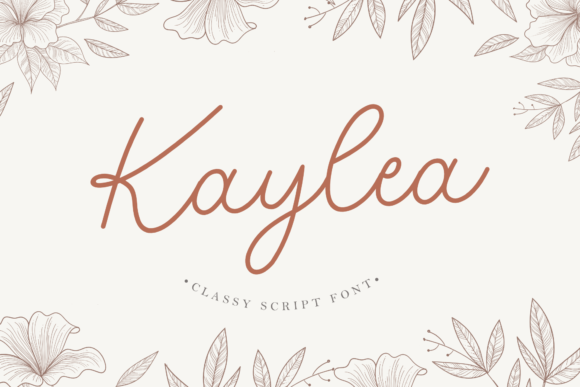
Kaylea Script: A Classy Font for Web Design
As a web designer, I’m always on the lookout for fonts that bring both personality and professionalism to a site. Kaylea Script has quickly become one of my go-to choices when it comes to adding a touch of elegance to digital projects. Its graceful curves and timeless charm make it perfect for headers, hero sections, and other visual elements where style matters.
A Font That Speaks to Creativity
Kaylea Script is more than just a script font—it’s a typeface that feels like it was designed with intention. Each letter carries a unique, handwritten quality that adds warmth and character to any design. It’s ideal for creative websites, boutique online stores, and personal brand identities looking to stand out without sacrificing clarity.
What I love most about Kaylea Script is how it balances sophistication with approachability. It doesn’t feel overly ornate or hard to read, which makes it a great choice for web use. Whether it’s used in a bold headline or a subtle accent, it brings a sense of refinement that resonates with modern audiences.
Using Kaylea Script in Web Layouts
I tested Kaylea Script in a few different scenarios, from landing pages to portfolio sites. In a hero section, it made a strong first impression—perfect for headlines that need to grab attention while still feeling inviting. On a product landing page, it worked well as a call-to-action button text, giving the design a polished yet creative edge.
One of the best parts of using Kaylea Script in web design is how it pairs with simpler fonts. For example, I paired it with a clean sans serif for body copy, which created a nice contrast. The script font stood out as a decorative element, while the sans serif kept the layout readable and professional.
Responsive Design and Readability
When testing Kaylea Script on mobile devices, I found it to be surprisingly legible at smaller sizes. It didn’t lose its charm or become too difficult to read, which is a big plus for responsive design. However, I would avoid using it for long paragraphs or dense content areas. Its decorative nature makes it better suited for short phrases, titles, and headings.
On dark backgrounds, the font maintained good contrast, but I noticed that on light backgrounds, it sometimes felt a bit too delicate. To counter that, I adjusted the line height and spacing slightly, which helped it stand out without overwhelming the design.
Best Uses for Kaylea Script in Digital Projects
Kaylea Script shines in areas where visual impact is key. It’s excellent for hero banners, website headers, and section titles. I also used it in a blog header, where it added a personal, artisanal feel that matched the site’s overall aesthetic.
For an online store, I experimented with using it on product banners and category headings. It gave the site a cohesive, branded look that felt authentic and high-quality. When paired with a minimalist background, it allowed the font to take center stage without competing with other design elements.
Another area where Kaylea Script excelled was in digital ads and social media graphics. Its elegant style made it ideal for promotional banners and campaign visuals, where a touch of class can make a big difference.
Things to Keep in Mind
While Kaylea Script is versatile, it’s not a one-size-fits-all solution. I wouldn’t recommend using it for small navigation menus or form labels, where clarity is essential. It also isn’t the best choice for long blocks of text, as it can become visually heavy and harder to scan.
Before using Kaylea Script on a live website, I always check the available styles, weights, and file formats. It’s important to ensure that the font supports the project’s needs, especially if it’s being used commercially. The font also includes alternates and ligatures, which can be useful for customizing the look of headings and titles.
Finally, if you’re using Kaylea Script for a client project, make sure to review the licensing terms. Some fonts have restrictions on commercial use, and it’s always better to double-check before finalizing a design.
Final Thoughts on Kaylea Script
Kaylea Script is a standout font that brings both beauty and usability to web design. It’s a great option for designers looking to add a touch of class to their digital projects without compromising readability or functionality. Whether you're working on a portfolio site, an online store, or a marketing campaign, this font offers a refined look that can elevate your brand’s visual identity.
With its timeless appeal and practical performance, Kaylea Script is a valuable addition to any designer’s toolkit. It’s a font that works well in a variety of contexts, making it a reliable choice for both personal and professional web projects.